A CLI Tool for Apple Developers
xcodex supports developers with typical workflows around iOS, iPadOS and macOS projects. It bundles build, tests, simulator control, device management, archives, TestFlight/App Store delivery, localization, code coverage, crash analysis and project maintenance in one terminal-based tool. The tool is designed for projects developed with Xcode but is not affiliated with Apple or Xcode.
Split-pane. Keyboard-driven.
Categories on the left, actions on the right. Navigate with arrow keys, execute with Enter. Settings persist automatically between sessions.
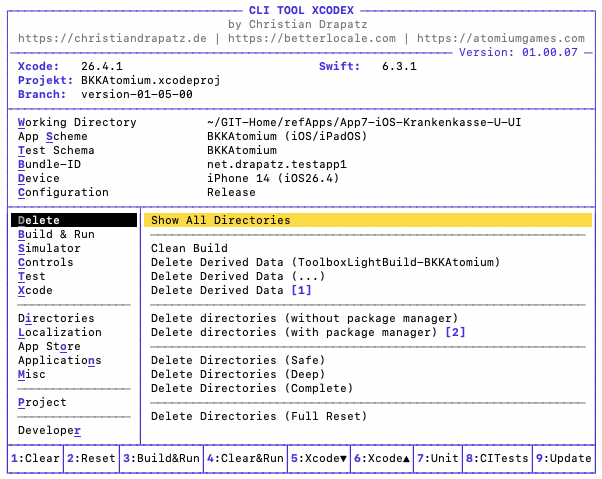
xcodex is split-pane and fully keyboard-driven: categories on the left, actions on the right. Use arrow keys to move between categories and actions, press Enter to execute a command. h opens the context-sensitive help overlay — Q quits xcodex.
xcodex has two main views: the XCode view with all developer tools and the Browser view — a keyboard-driven file browser. No context switching, no mouse, no window management. Switch with the Space key or jump directly with Shift+x or Shift+w.
Shift+a opens the Browser view instantly in the current working directory — no typing, no searching. One keystroke and you land exactly where you need to be.
↑↓ |
Navigate within the active pane |
←→ |
Switch between category and action pane |
| ↵ | Execute the selected command |
| h | Show context-sensitive help overlay |
| Q | Quit the application |
| Space | Switch between XCode view and Browser view |
| ⇧x | Jump directly to XCode view |
| ⇧w | Jump directly to Browser view |
| ⇧a | Open Browser view in the current working directory |
Ten categories.
Every daily workflow.
No flag lookup. No context switching. Zero setup — one interface that covers everything Apple developers do every day:
Build & Run
Build and launch with preset optimizations — Quick Reset, Full Reset or straight Build & Run. Isolated DerivedData, every time.
- Build
- Build & Run
- Quick Reset & Build
- Full Reset & Build
- Isolated DerivedData
- Project configuration inspector
Test
Unit tests, UI tests, or all tests at once — with automatically applied build optimizations and 3-state result reporting.
- Run unit tests
- Run UI tests
- Run all tests
- 3-state results (✅ ⚠️ ❌)
- Compile-only / run-only modes
Automated Tests
Run tests on a configurable schedule — from 1 minute to 24 hours. Live display and macOS notification on completion.
- Configurable interval (1 min – 24 h)
- Schemes & test plans
- Live result display
- macOS notification on completion
- Automatic repeat
App Store & Distribution
Archive, export and upload directly to TestFlight and the App Store — for iOS and macOS. Fully automated from the terminal.
- Archive & IPA (iOS)
- Upload to TestFlight
- App Store submission
- DMG, Notarize & Staple (macOS)
- Release checks & notes from Git
- Manage archives
Dependencies
Resolve and inspect SPM, CocoaPods and Carthage — without memorizing a single flag.
- Show dependency graph
- Resolve all (SPM + Pods + Carthage)
- Resolve SPM only
- Resolve CocoaPods only
- Resolve Carthage only
Clean & Cache
Remove build artifacts, clear DerivedData, Simulator caches and Module Cache in one step.
- xcodebuild clean
- Delete DerivedData
- Delete Simulator Cache
- Delete Xcode Caches
- Delete all caches at once
Simulator
Launch, restart, reset, screenshot, record. Toggle Dark/Light Mode — all without leaving the terminal.
- Launch & restart app
- Screenshot → Desktop (PNG)
- Video recording (MP4)
- Dark / Light Mode toggle
- Full simulator reset
Physical Devices
Install, launch and stream logs directly on iPhones and iPads — auto-detected, no Xcode GUI needed.
- Install app on device
- Launch app
- List installed apps
- Live device log
- Auto-detection via devicectl
Misc
Localization checks, crash reports with symbolication, performance profiling via Instruments and provisioning profile management.
- Find missing translation keys
- Consistency check
- Crash Reports & Symbolication
- Instruments (Beta)
- Provisioning Profiles
What makes it different.
Not just a wrapper around xcodebuild. Thoughtfully designed for real developer workflows.
How Xcode normally builds
Xcode writes all build artifacts into a shared DerivedData folder — compiled files, index data and temporary products from all projects land there simultaneously. When Xcode is indexing in the background or old artifacts from a previous project remain, silent conflicts arise: builds fail for unclear reasons, caches get reused incorrectly, errors can't be reproduced. Deleting everything with "Clean Build Folder" costs minutes and doesn't address the root cause.
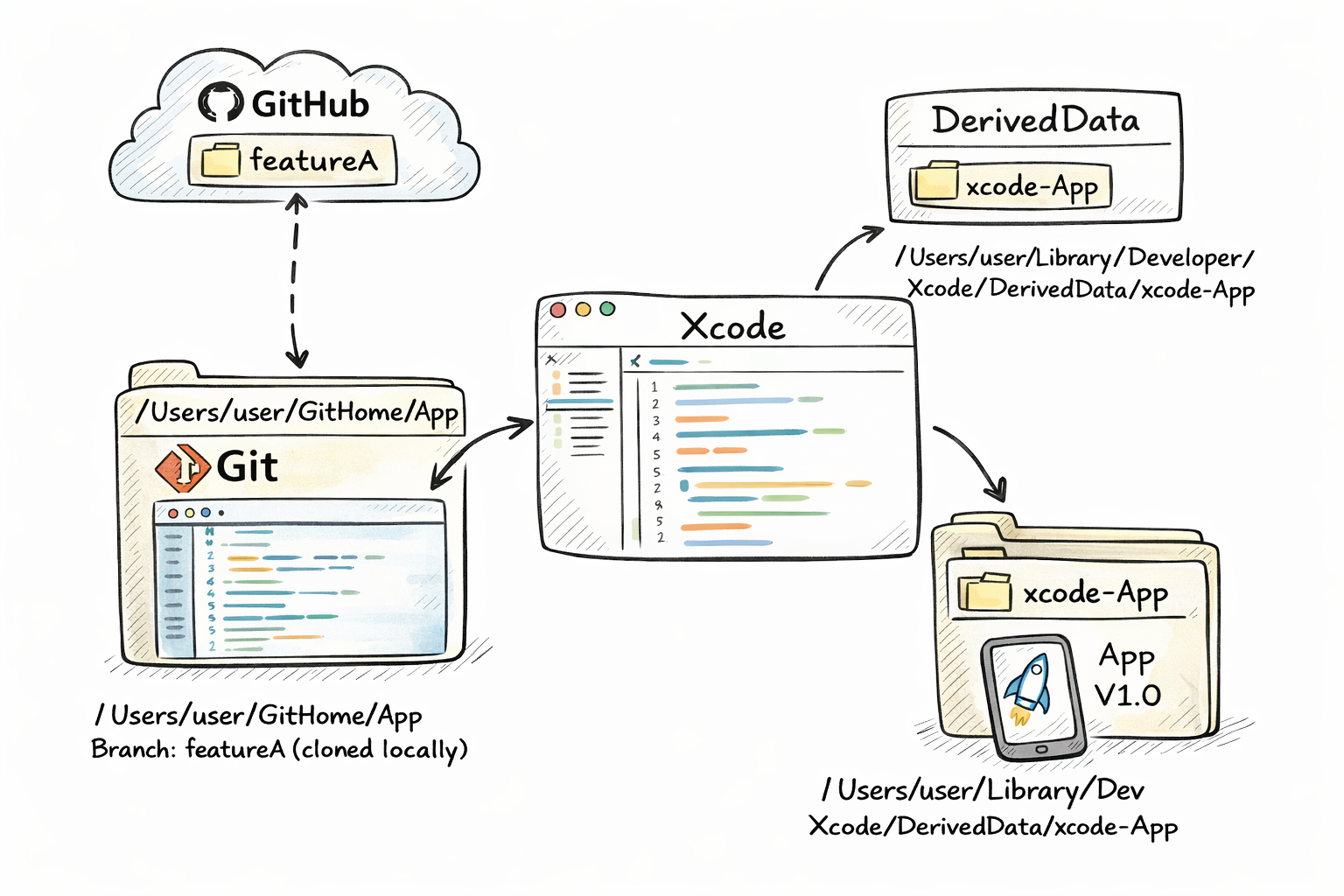
Own DerivedData — clean and isolated
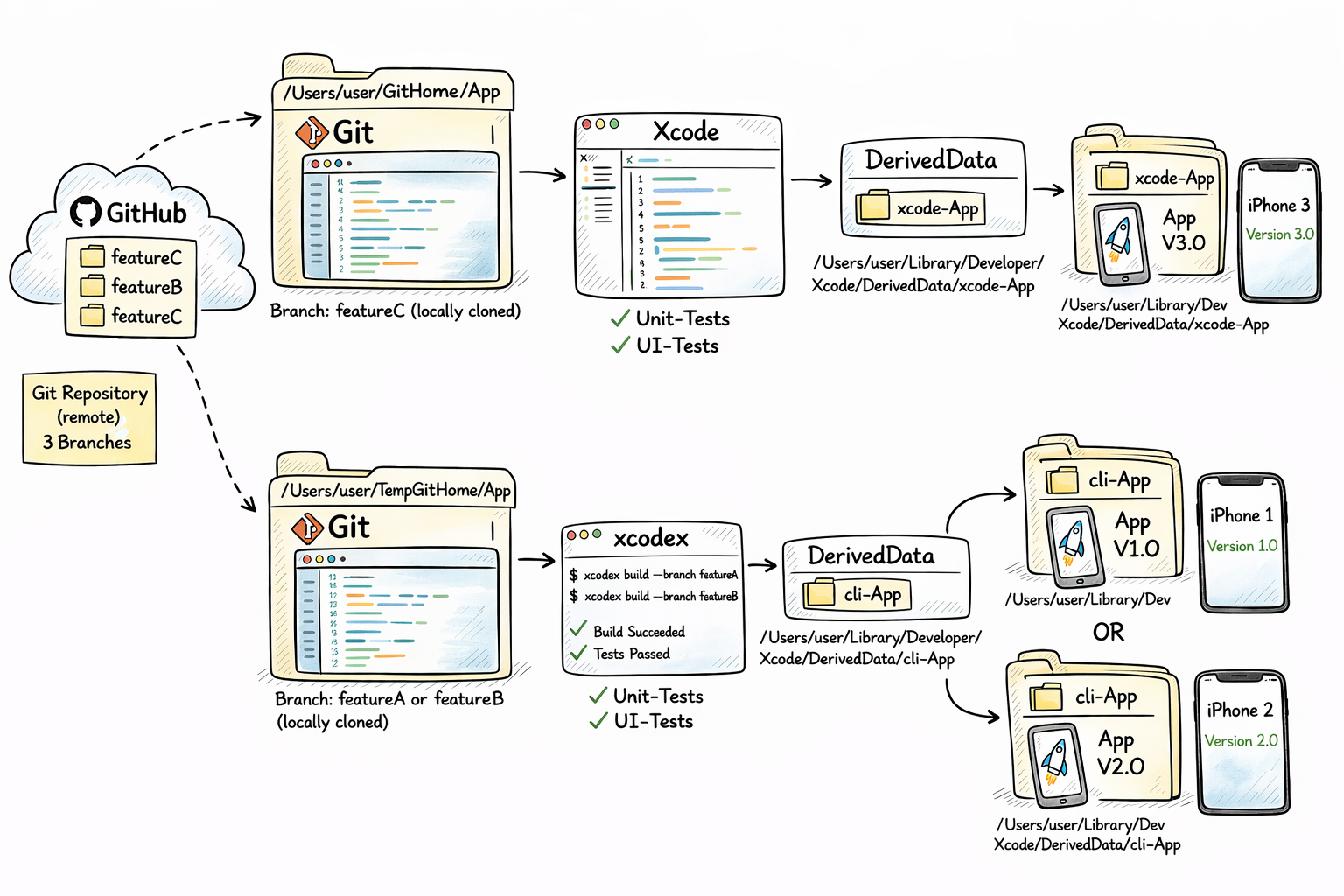
xcodex builds into its own DerivedData folder — completely independent from Xcode. Both can run simultaneously without interfering. Every build starts in a clean environment: no stale artifacts, no side effects, no unexpected cache reuse. If something breaks, the cause is always the current code — never a build artifact left over from yesterday.
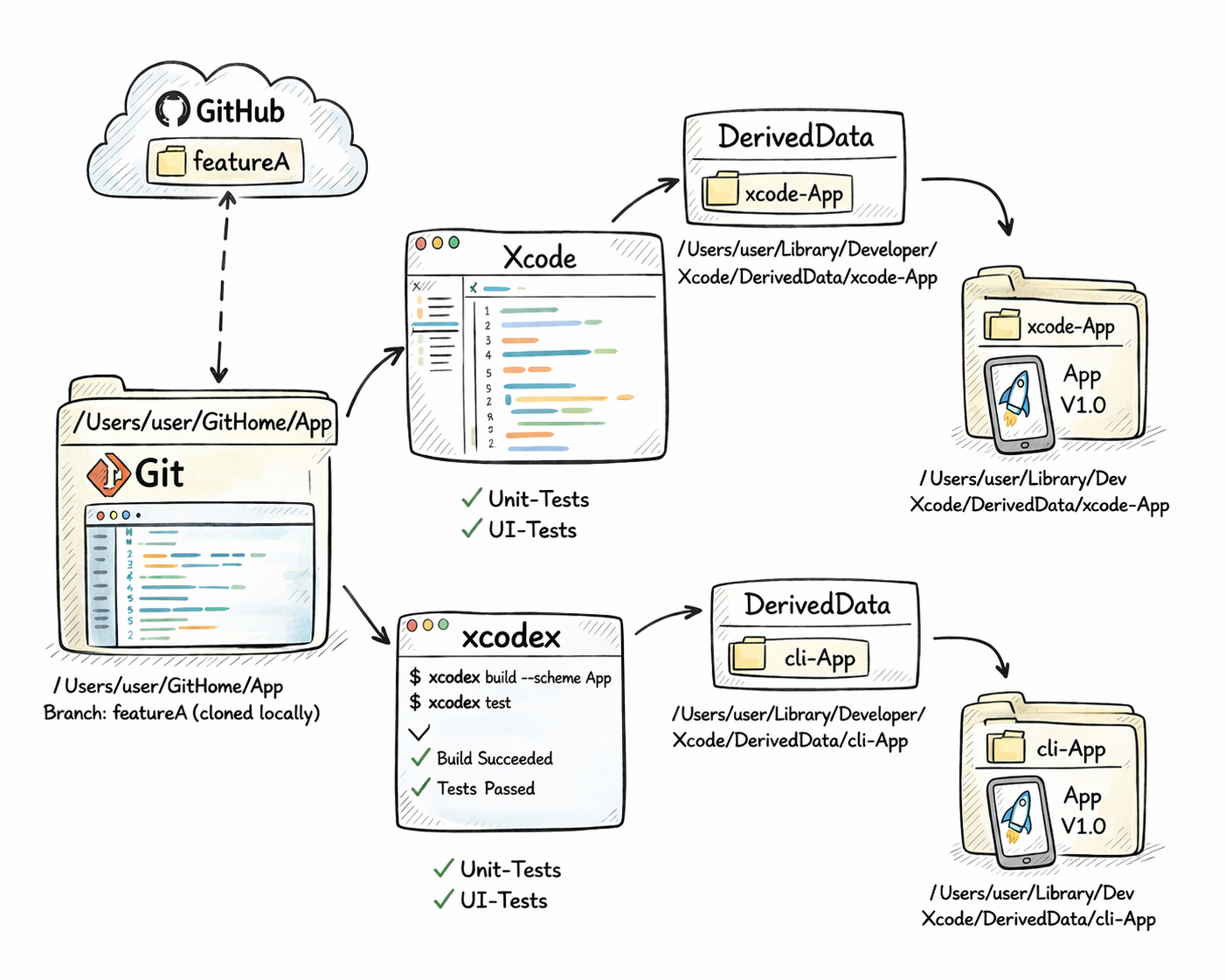
Branch & Commit — build and compare
Check out any branch or commit, build it locally and launch — without touching your own development environment. xcodex clones the repository into a separate directory and links it as an independent project. The develop branch runs in parallel alongside your own — builds, tests and analysis all target the cloned state. No risk, no merge conflicts, no context loss.
Up and running in minutes.
Five commands. No build tools, no package managers, no config files.
Clone the repository
git clone https://github.com/drapatzc/xcodex.git ~/Developer/xcodexSet executable permission
chmod +x ~/Developer/xcodex/xcodexSet up shell alias
echo 'alias xcodex="$HOME/Developer/xcodex/xcodex"' >> ~/.zshrc
source ~/.zshrc
echo 'alias xcodex="$HOME/Developer/xcodex/xcodex"' >> ~/.bash_profile
source ~/.bash_profilealias xcodex="$HOME/Developer/xcodex/xcodex"
funcsave xcodexRun from your project root
cd YourXcodeProject
xcodexUpdate
cd ~/Developer/xcodex
git pull
Download xcodex
Download the xcodex binary directly — no Git clone required. Only steps 2 to 4 apply.
Download xcodexRequirements
Not just for iOS developers.
The CLI tool xcodex makes Apple development accessible to the whole team.
iOS Developers
Your daily workflow, streamlined. Build, test, clean — without interrupting your focus in the editor.
Android Developers
Familiar terminal interface. Check out the iOS codebase, build and test — no Xcode knowledge required.
QA & Testers
No TestFlight waiting. Build directly from source, test on any iOS version. Press A, configure once — done.
Designers & POs
See changes in context immediately, on different iOS versions. Present the current build — without developer assistance.
Free. Transparent. No strings attached.
No subscriptions, no feature gates, no hidden conditions.
Permitted
- Private use
- Commercial use
- Team-wide deployment
- Unlimited installations
- No registration, no license key
Not Allowed
- Selling or reselling the software
- Distributing as standalone product
- Bundling in paid products (without permission)
- Reverse engineering
Disclaimer
This software is provided without any warranty. Use is at your own risk. The author is not liable for damages arising from its use.
© 2026 Christian Drapatz
All rights reserved
The Developer
I build software for the Apple ecosystem — native iOS and macOS apps, developer tools and games. My focus is on products that are technically clean, practically useful and independently valuable.
Portfolio
Personal website, projects, contact and background on my development work.
christiandrapatz.de →AI Apps
AI-powered macOS tools for iOS and macOS developers.
Games
Independent iOS games — developed and published in the Apple ecosystem.
Apps
Practical apps for iOS and macOS — clear concepts, standalone products.
Support its development.
If this tool saves you time every day and you'd like to support further development, buying a coffee is warmly welcome. Every contribution helps keep the project alive.

Voluntary — no effect on license or features.

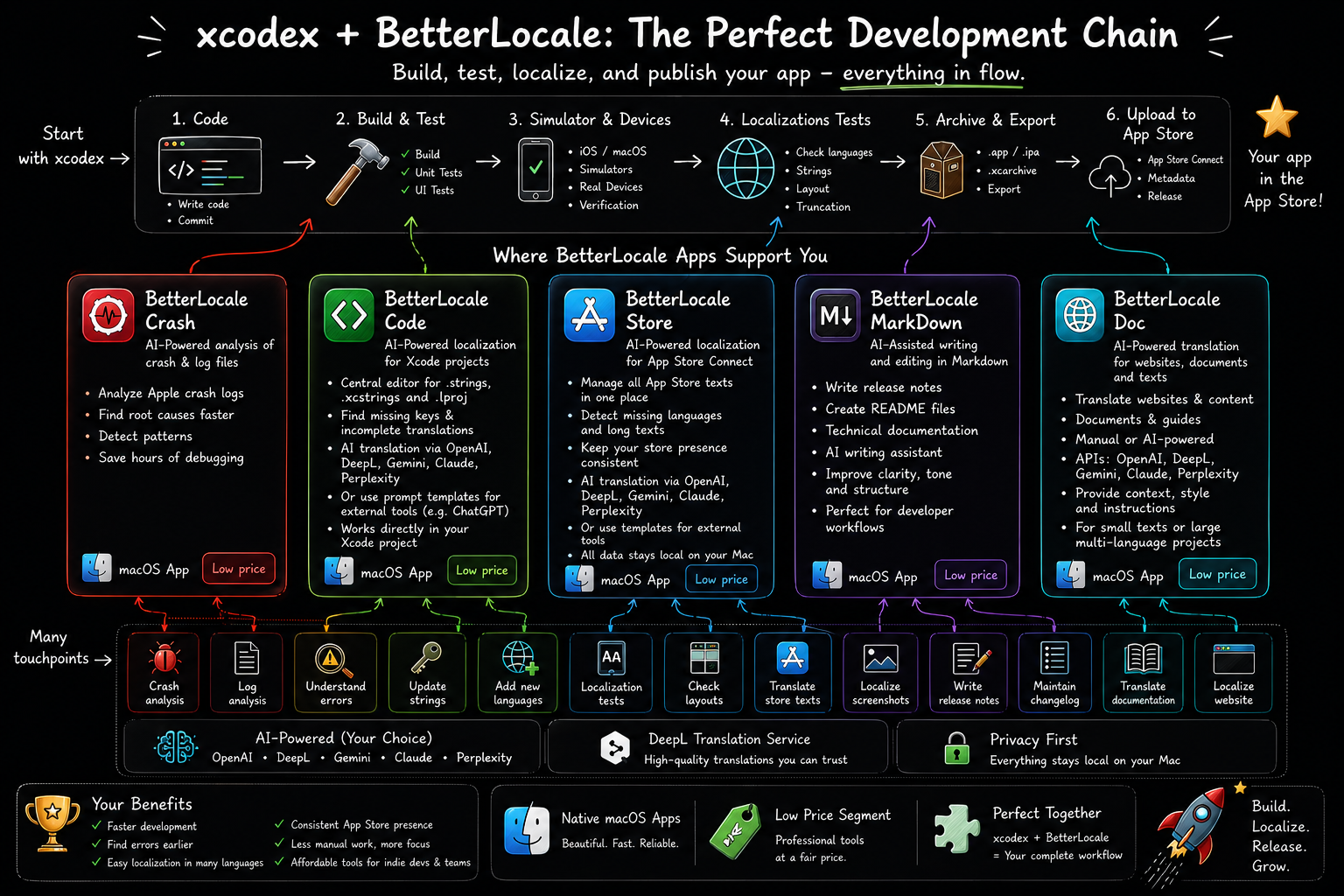
There's more to discover.
How xcodex compares to Xcode and where it fits alongside other tools — all on one page.
xcodex alongside Xcode
The right tool for each task. A detailed comparison — what xcodex covers and where Xcode takes the lead.
Learn more →Compared to other tools
xcodebuild, fastlane, simctl — xcodex bundles the tasks you use every day into one clear terminal interface.
Learn more →